
Tournament Directors for approved tournaments can now submit online accreditation forms for their dates under the “Getting your tournament on the US Squash Calendar” tab. After submitting the online form, please allow two weeks for the event to be posted to the national tournaments schedule.
For all junior tournaments and other tournaments using Stripe online registration, please follow the link below. Please be advised that no entry forms or manual registrations can be added for events utilizing the Stripe system; all entries must be submitted through Stripe online registration.
Online Registration Accreditation FormFor manual paper entry forms, please click below:
Manual Entry Accreditation Form
In order for US Squash to support accredited tournaments and continue to develop current and future programming, fees are applied to all US Squash Accredited Tournaments. Please see below to review the applicable fees and timelines for your tournament.
Accreditation Fees and Timeline
Several times throughout the year, Tournament Directors will be asked to submit accreditation requests for either the season (September – May) or summer months (June – August). It is the Tournament Director’s responsibility for submitting accreditation requests during these periods.
US Squash and Regional Coordinators use these requests to help create a national calendar that does not conflict with the national championship calendar and that maintains the integrity of the ranking system while ensuring regional fairness with regards to who receives what level of tournaments from year to year.
Please reach out to your Regional Coordinator as you start to prepare your tournament scheduling for the upcoming seasons.
Please note that tournaments are not guaranteed to receive accreditation on the same date or the same status for each season. Tournament Directors must apply for and are expected to be flexible with event dates. US Squash will monitor and control the scheduling of tournaments regionally and nationally to benefit the members and some tournaments may be asked to shift dates from those requested in an application to provide all Tournament Directors with the best promotional opportunities.
Connecticut:
Joey Ramos and Steve Scharff – joey.ramos77@gmail.com and stevescharff@hotmail.com
Mid-Atlantic:
Peter Heffernan and David Keating – peterh@meadowmill.com and david@keating.us
Midwest – Neal Tew – neal@thet.us
New England – Tom Poor – tpoor43@aol.com
New Jersey – US Squash – tournaments@ussquash.com
New York:
Mike Callaway and Ben Oliner – MCallaway@lifetimefitness.com and benjamin.oliner@gmail.com
Pennsylvania – Ron Koening – rkoenig@sch.org
Southeast – US Squash – tournaments@ussquash.com
West Coast – Renato Paiva- renato@sandiegosquash.com
Managing a Squash Tournament is a complex and sometimes difficult process. However, with the right set of tools and support from US Squash, this process can also be fun! Please see the information below for a general overview of what goes into a tournament, entry management, draw creation assistance, give feedback to US Squash, and how to report incidents that occur at your accredited tournament.
It is recommended that Tournament Directors read through the following brief Tournament Guide for either Junior or Open/Adult tournaments:
Junior Tournament Guide Open/Adult Tournament Guide
Players may withdraw from or change divisions from these tournaments by accessing either their player profiles or from the entrants list on the tournament information page.
In order to submit a Withdraw or Division Change Request, a player must be logged into their account and then select “Change Request” next to their upcoming tournament. Players will have the option of selecting “Request Change Division” or to “Request Withdraw/Refund.” Sending a request will not automatically push a request through; any Withdraw and Divisions Change Request must be approved by the Tournament Director.
Players must read through the policies surrounding withdraws and refunds before they are able to submit the request. After a request has been made, a Tournament Director can review pending requests and may either approve or deny the request based on US Squash Policies. Player requests will all be time stamped and Tournament Directors will automatically know if a player will receive a rankings penalty, qualify for a refund, or can switch divisions.
Player Change Request Instructions
Tournament Directors should use the following Draw Creation Worksheets to create accredited draw types for their tournament.
Junior Worksheet Adult Worksheet
In an effort to improve all aspects of managing tournaments with support from US Squash, we want to ask what improvements can be made current programming. Please visit the link below to submit suggestions that would fix issues, make the software easier to use, or provide general recommendations to US Squash.
Tournament Director Feedback FormIf a player, parent, coach, or member observes a violation of a US Squash Policy, Guideline, Code of Conduct or Rule during a US Squash accredited event, he or she is encouraged to report it to the Tournament or Event Director (if applicable) or US Squash staff member if available. Tournament or Event Directors will then take appropriate action at that time, and in addition may in their discretion complete and file an Incident Report with US Squash. Please click below for more information and how to submit an Incident Report form.
Incident Reporting Information
Club Locker is a mobile friendly end-to-end squash solution for players, pros, and fans. From your first steps on court to your fiercest competitions we’ve got the tools to push you forward and keep you current.
Find a match with those closest to your rating, sign up for strength building classes and activities, and book that private lesson to hone your game then enter friendly, league, and tournament matches in seconds and get a rating to connect with the largest and most active network of squash players in the world.
Please see below for a list of features and the technology recommended to use the software at your next event!
FEATURES
Live Scoring
Club Locker allows players access refereeing software that will instantaneously update and broadcast live match scores across the internet. Anyone can live score a game, and this can be used for accredited play, including friendly matches, competitive tournaments, and league play!
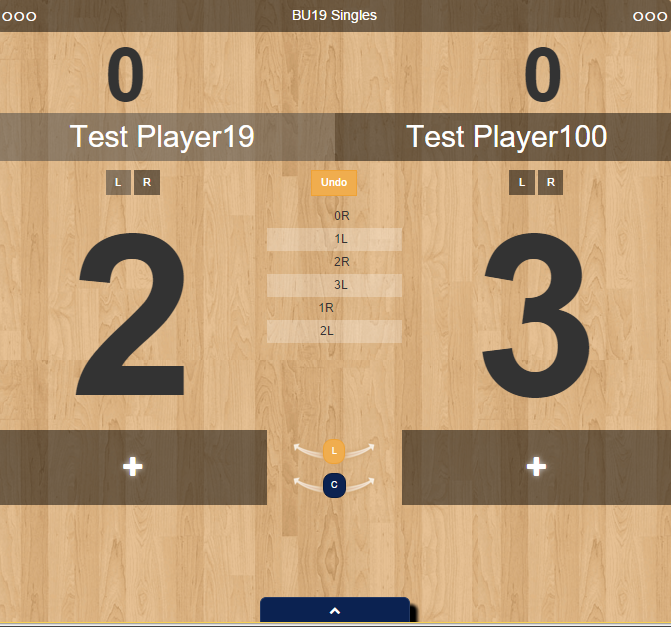
Live Scoreboard
A Live Scoreboard provides updates to anyone with an internet enabled device or computer at www.clublocker.com. Users can log in and watch their friends and family compete whether they are at the court watching them or on the other side of the world!
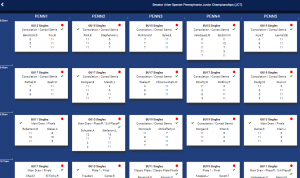
Tournaments
Check your court status and watch the tournament unfold before your eyes.
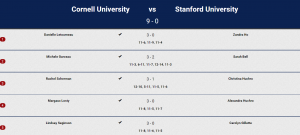
League Matches
Keep track of team matches on multiple courts all on one easily accessible screen
EQUIPMENT NEEDS
Internet Enabled Devices
Any basic internet enable device can access Club Locker to view scores or live score current matches. US Squash recommends Apple iPod Touch or iPads for their ease of use, compatibility with Apple TV, and relatively low price. Look for refurbished models if cost is of a concern. Facilities need generally one device per court, but for extensive tournament use, backup devices are also recommended.
http://store.apple.com/us (starting at $149 each and up)
Display Monitor
It is recommended to use televisions or monitors that are a minimum diagonal of 32”. LCD or LED televisions are now inexpensive and available from many retailers online and in stores.
www.amazon.com (roughly $200 and up)
Apple TV or other screen sharing system
Any screen sharing system will work to display either the referee app for each court, or the overall scoreboard or tournament schedule. Depending on your internet enabled devices, different systems may be needed and it is recommended to review each system’s requirements before making a final decision on the type of hardware to purchase.
http://store.apple.com/us (roughly $69 each)
Strong Wireless Connection
All of this technology is depended on a strong wireless signal with plenty of internet bandwidth. Basic home internet connections (~3 megabytes upload/download) are not sufficient for facilities with many simultaneous connections (computers, devices, guests at the facility, etc.). Private networks are encouraged to dedicate enough bandwidth to ensure a seamless experience with the live scoring.
Pricing
Club Locker is available as a benefit to all member clubs and accredited play, and no additional fees are required!
Additional Questions
Please contact clublocker@ussquash.com with any additional questions with the setup of your facility.
More Club Locker Information
Please see below for additional resources that may be of assistance for your tournament.
Draw Templates
8 person 16 person 32 personRound Robins
4 person 5 person 6 person 7 person 8 person9 person
Seeding Positions
8, 16, and 32 Player Draw 64 Player Draw 128 Player DrawScore Sheets
Singles Matches Doubles MatchesIf you need any additional support or have any questions about running a tournament, please contact us at tournaments@ussquash.com or call us in the office at 212.268.4090.